Skip to content

Modelování a projekce

octicon-noteNote

Homogenní souřadnice, modelovací, pohledová a projekční matice, perspektivní a ortografická projekce. Základní afinní transformace.

PV189, PV112

  • Right-hand rule Mnemotechnická pomůcka pro určení orientace os v kartézské soustavě souřadnic. Taky se používá pro určení směru vektorového součinu.

    Right-hand rule

    octicon-tipTip

    Osa X je dána ukazováčkem, osa Y prostředníčkem, osa Z palcem. Pokud Y míří nahoru, pak ano, člověk si u toho může vykroutit ruku, ale alespoň si to zapamatuje.

  • Kartézská soustava souřadnic Right-handed systém definován třemi kolmými osami. Ve 2D jsou to xx a yy. Ve 3D jsou to xx, yy a zz. Jsou na sebe v zájemně kolmé. Počátek je v bodě, kde se protínají všechny osy, označovaném jako 00.

  • Homogenní souřadnice Hack, kdy reprezentujeme souřadnici v 3D prostoru pomocí 4 čísel, abychom mohli zapsat translaci pomocí matice. Využívá se v projektivní geometrii, pro projekci 3D scén na 2D plochu.

    Převod z kartézských na homogenní souřadnice: (x,y,z)(x,y,z,1)(x, y, z) \to (x, y, z, 1).

    Převod z homogenních na kartézské souřadnice: (x,y,z,w)(xw,yw,zw)(x, y, z, w) \to (\frac{x}{w}, \frac{y}{w}, \frac{z}{w}).

    Body, kde w=0w = 0 jsou body v nekonečnu. Využívá se pro popis pohybu k nekonečnu, který se v kartézských souřadnicích nedá popsat.

octicon-importantImportant

Pro implementaci v OpenGL viz Renderování s využitím GPU.

octicon-warningWarning

Při zápisu matic bacha na to, jestli jsou row-major nebo column-major. Třeba v OpenGL to znamená, že se všechny matice píší v transponované podobě, jelikož OpenGL je column-major a v takovém pořádí jsou i parametery mat2, mat3 a mat4 V GLSL.

  • Modelovací matice MM Převádí souřadnice z prostoru objektu (local space) do prostoru světa (world space). Využívá se pro rotaci (RR), škálování (SS) a translaci (TT) objektu.

    M=TRSM = T \cdot R \cdot S
  • Pohledová matice / view matrix VV
    Převádí souřadnice z prostoru světa (world space) do prostoru před kamerou (camera space). Otáčí světem, aby kamera byla jeho středem.1

    V=[RxRyRz0UxUyUz0DxDyDz00001][100Px010Py001Pz0001]V = \begin{bmatrix} \color{red}{R_x} & \color{red}{R_y} & \color{red}{R_z} & 0 \\ \color{green}{U_x} & \color{green}{U_y} & \color{green}{U_z} & 0 \\ \color{blue}{D_x} & \color{blue}{D_y} & \color{blue}{D_z} & 0 \\ 0 & 0 & 0 & 1 \end{bmatrix} \cdot \begin{bmatrix} 1 & 0 & 0 & -\color{purple}{P_x} \\ 0 & 1 & 0 & -\color{purple}{P_y} \\ 0 & 0 & 1 & -\color{purple}{P_z} \\ 0 & 0 & 0 & 1 \end{bmatrix}

    kde:

    • R\color{red}{R} je vektor, který ukazuje doprava od kamery.

    • U\color{green}{U} je vektor, který ukazuje nahoru od kamery.

    • D\color{blue}{D} je vektor, který ukazuje dopředu od kamery.

    • P\color{purple}{P} je pozice kamery.

      octicon-noteNote

      Všimni si, že levá matice je transponovaná a poziční vektor v pravé matici je negovaný. Je to proto, že otáčíme a posouváme celým světem tak, aby kamera byla v počátku, musíme proto provést inverzní operace vůči těm, které chceme provést s kamerou. 1

  • Frustum Část 3D tělesa (nejčastěji pyramidy nebo jehlanu) mezi dvěma rovnoběžnými rovinami. Doslovný překlad je “komolý jehlan”

  • Projekční matice / projection matrix PP Převádí souřadnice z prostoru před kamerou (camera space) do clip space.

    Používá se zejména ortografická projekce (PorthoP_\text{ortho}) a perspektivní projekce (PperspP_\text{persp}).

  • MVP matice Pro převod modelu z jeho lokálního prostoru do clip space použijeme:

    vclip=PVMvlocal\vec{v}_\text{clip} = P \cdot V \cdot M \cdot \vec{v}_\text{local}

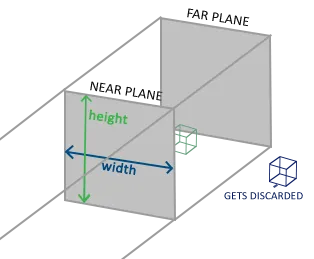
Používáme především k vykreslení 2D scén. Osu Z můžeme využít, abychom jeden sprite schovali za jiný. Nicméně objekty dál od kamery jsou stejně velké jako ty blízko kamery. 1

width=500

Je dána 6 parametry:

  • left\text{left} - levá hranice (X),
  • right\text{right} - pravá hranice (X),
  • bottom\text{bottom} - spodní hranice (Y),
  • top\text{top} - horní hranice (Y),
  • near\text{near} - blízká hranice (Z),
  • far\text{far} - daleká hranice (Z).

Společně definují boxík, kde je (left,bottom,near)(\text{left}, \text{bottom}, -\text{near}) levý spodní roh a (right,top,far)(\text{right}, \text{top}, -\text{far}) pravý horní roh. Úkolem matice PorthoP_\text{ortho} je nasoukat tento boxík do krychle (1,1,1)(1,1,1)(-1, -1, -1) \to (1, 1, 1) (a navíc flipnou Z, protože OpenGL mění handedness).

Portho=CST=[1000010000100001][2right-left00002top-bottom00002far-near00001][100right+left2010top+bottom2001far+near20001]=[2rightleft00right+leftrightleft02topbottom0top+bottomtopbottom002farnearfar+nearfarnear0001]\begin{aligned} P_\text{ortho} &= C \cdot S \cdot T \\ &= \begin{bmatrix} 1 & 0 & 0 & 0 \\ 0 & 1 & 0 & 0 \\ 0 & 0 & -1 & 0 \\ 0 & 0 & 0 & 1 \\ \end{bmatrix} \cdot \begin{bmatrix} \frac{2}{\text{right-left}} & 0 & 0 & 0 \\ 0 & \frac{2}{\text{top-bottom}} & 0 & 0 \\ 0 & 0 & \frac{2}{\text{far-near}} & 0 \\ 0 & 0 & 0 & 1 \\ \end{bmatrix} \cdot \begin{bmatrix} 1 & 0 & 0 & -\frac{\text{right+left}}{2} \\ 0 & 1 & 0 & -\frac{\text{top+bottom}}{2} \\ 0 & 0 & 1 & -\frac{\text{far+near}}{2} \\ 0 & 0 & 0 & 1 \\ \end{bmatrix} \\ &= \begin{bmatrix} \frac{2}{\text{right}-\text{left}} & 0 & 0 & -\frac{\text{right}+\text{left}}{\text{right}-\text{left}} \\ 0 & \frac{2}{\text{top}-\text{bottom}} & 0 & -\frac{\text{top}+\text{bottom}}{\text{top}-\text{bottom}} \\ 0 & 0 & -\frac{2}{\text{far}-\text{near}} & -\frac{\text{far}+\text{near}}{\text{far}-\text{near}} \\ 0 & 0 & 0 & 1 \\ \end{bmatrix} \end{aligned}

kde:

  • CC obrací osu Z, kvůli přechodu z right-handed do left-handed (týká se OpenGL 2),
  • SS definuje velikost kvádru, který se vleze do clip space,
  • TT posouvá počátek doprostřed kvádru.

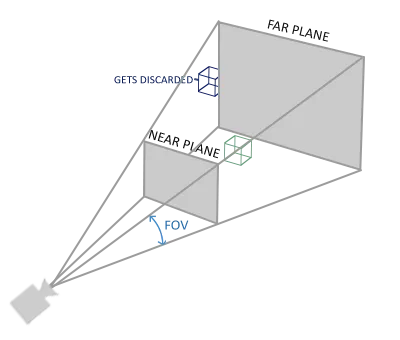
Zmenšuje objekty, které jsou dále od kamery. 1

width=500

Je definována 4 parametry:

  • FOVy\text{FOV}_y - field of view (úhel zorného pole) v ose Y,
  • aspect\text{aspect} - poměr šířky a výšky okna,
  • near\text{near} - blízká hranice,
  • far\text{far} - daleká hranice.

V matici PperspP_\text{persp} se vyskytují následující mezihodnoty:

  • top=neartan(FOVy2)\text{top} = \text{near} \cdot \tan \left( \frac{\text{FOV}_y}{2} \right),

  • bottom=top\text{bottom} = -\text{top},

  • right=topaspect\text{right} = \text{top} \cdot \text{aspect},

  • left=right\text{left} = -\text{right}.

  • Translace frustumu Posouváme špičku frustumu do počátku souřadného systému. 3

    T=[100left+right2010bottom+top200100001]T = \begin{bmatrix} 1 & 0 & 0 & -\frac{\text{left} + \text{right}}{2} \\ 0 & 1 & 0 & -\frac{\text{bottom} + \text{top}}{2} \\ 0 & 0 & 1 & 0 \\ 0 & 0 & 0 & 1 \\ \end{bmatrix}

    octicon-noteNote

    Všimni si, že. Pokud používáme 4-parametrickou verzi, tak je to matice identity a tím pádem není potřeba.

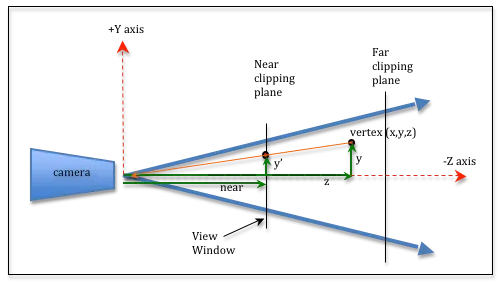
  • Perspective divide Objekty blíže k rovině near\text{near} budou větší než objekty dále. Rovina near\text{near} reprezentuje plochu obrazovky, na kterou jsou všechny body promítány.

    Perspective divide 3

    width=500

    V obrázku výše je bod (x,y,z)(x, y, z) promítnut na rovinu near\text{near} jako (x,y,near)(x', y', near). Vznikají tak dva trojúhelníky, které jsou si sobě podobné a proto mají stejné poměry stran. Platí tedy ynear=yz\frac{y'}{\text{near}} = \frac{y}{z}. Pak y=ynearzy' = \frac{y \cdot \text{near}}{z}. Chceme tedy, aby platilo:

    x=xnearzy=ynearz\begin{aligned} x' = \frac{x \cdot \text{near}}{z} \\ y' = \frac{y \cdot \text{near}}{z} \end{aligned}

    Což můžeme vyjádřit v homogenních souřadnicích vyjadřít dělením ww jako:

    D=[near0000near0000100010]D = \begin{bmatrix} \text{near} & 0 & 0 & 0 \\ 0 & \text{near} & 0 & 0 \\ 0 & 0 & 1 & 0 \\ 0 & 0 & \color{red}{-1} & \color{red}{0} \\ \end{bmatrix}
  • Velikost okna Šířka a výška okna dána pomocí left,right,bottom,top\text{left}, \text{right}, \text{bottom}, \text{top} se musí vlézt do intervalu (1.0,1.0)(-1.0, 1.0), proto je potřeba provést škálování:

    S=[2rightleft00002topbottom0000100001]S = \begin{bmatrix} \frac{2}{\text{right} - \text{left}} & 0 & 0 & 0 \\ 0 & \frac{2}{\text{top} - \text{bottom}} & 0 & 0 \\ 0 & 0 & 1 & 0 \\ 0 & 0 & 0 & 1 \\ \end{bmatrix}
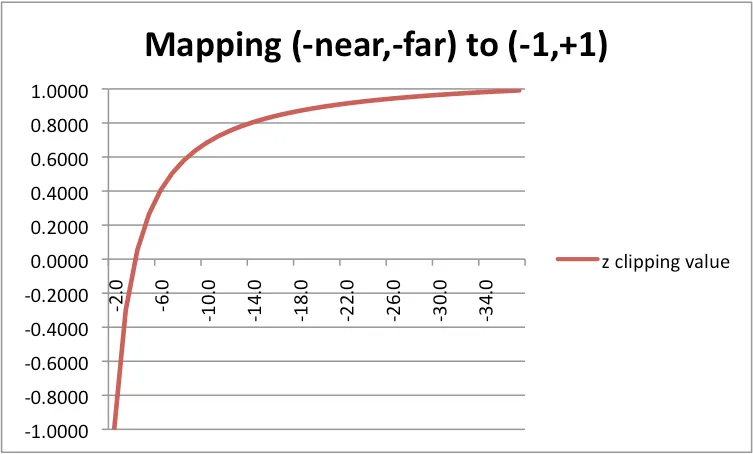
  • Přemapování hloubky Chceme zachovat tu schopnost souřadnice zz nám říct, že něco je před něčím jiným. Potřebujeme proto přemapovat interval (near,far)(-\text{near}, -\text{far}) na (1.0,1.0)(-1.0, 1.0). Jelikož desetinná čísla mají tendenci vytvářet artefakty, chceme aby toto mapování bylo nelineární tak, aby bylo přesnější blíže near\text{near}. Použijeme c1z+c2\frac{c_1}{-z} + c_2, kde c1c_1 a c2c_2 jsou konstanty zvoleny pomocí:

    octicon-noteNote

    Interval (near,far)(-\text{near}, -\text{far}) obsahuje negace, neboť kamera se dívá do -Z osy, ale tyto hodnoty zadáváme jako kladná čísla.

    octicon-noteNote

    z-z v rovnici výše je zodpovědné za přepnutí mezi right-handed a left-handed systémem souřadnic v OpenGL.

    Depth mapping 3

    width=500

    1.0=c1(near)+c21.0=c1(far)+c2\begin{aligned} -1.0 &= \frac{c_1}{-(-\text{near})} + c_2 \\ 1.0 &= \frac{c_1}{-(-\text{far})} + c_2 \end{aligned}

    Tedy:

    c1=2farnearnearfarc2=far+nearfarnear\begin{aligned} c_1 &= \frac{2 \cdot \text{far} \cdot \text{near}}{\text{near} - \text{far}} \\ c_2 &= \frac{\text{far} + \text{near}}{\text{far} - \text{near}} \end{aligned}

    Pokud c1z+c2\frac{c_1}{-z} + c_2 přepíšeme jako (c1+c2(z))z=(c2z+c1)z\frac{(c_1 + c_2 \cdot (-z))}{-z} = \frac{(-c_2 \cdot z + c_1)}{-z}, můžeme opět použít homogenní souřadnice a dělení ww a získáme:

    Mdepth=[1000010000c2c10010]=[1000010000far+nearfarnear2farnearnearfar0010]M_\text{depth} = \begin{bmatrix} 1 & 0 & 0 & 0 \\ 0 & 1 & 0 & 0 \\ 0 & 0 & -c_2 & c_1 \\ 0 & 0 & -1 & 0 \\ \end{bmatrix} = \begin{bmatrix} 1 & 0 & 0 & 0 \\ 0 & 1 & 0 & 0 \\ 0 & 0 & -\frac{\text{far} + \text{near}}{\text{far} - \text{near}} & \frac{2 \cdot \text{far} \cdot \text{near}}{\text{near} - \text{far}} \\ 0 & 0 & -1 & 0 \\ \end{bmatrix}

Výsledná matice je:

Ppersp=MdepthSDT=[2nearrightleft00nearright+leftrightleft02neartopbottom0neartop+bottomtopbottom00far+nearfarnear2farnearnearfar0010]P_\text{persp} = M_\text{depth} \cdot S \cdot D \cdot T = \begin{bmatrix} \textcolor{green}{\frac{2 \cdot \text{near}}{\text{right} - \text{left}}} & 0 & 0 & \textcolor{purple}{-\text{near} \cdot \frac{\text{right} + \text{left}}{\text{right} - \text{left}}} \\ 0 & \textcolor{blue}{\frac{2 \cdot \text{near}}{\text{top} - \text{bottom}}} & 0 & \textcolor{#F56FA1}{-\text{near} \cdot \frac{\text{top} + \text{bottom}}{\text{top} - \text{bottom}}} \\ % Nika: použij cyklamenovou farbu 0 & 0 & -\frac{\text{far} + \text{near}}{\text{far} - \text{near}} & \frac{2 \cdot \text{far} \cdot \text{near}}{\text{near} - \text{far}} \\ 0 & 0 & -1 & 0 \\ \end{bmatrix}

Tahle matice funguje pro obecné frustum dané parametry left,right,bottom,top,near,far\text{left}, \text{right}, \text{bottom}, \text{top}, \text{near}, \text{far}. Pokud dosadíme původní parametry za mezihodnoty:

2nearrightleft=2near2right=neartopaspect=nearneartan(FOVy2)aspect=cot(FOVy2)aspect2neartopbottom=2near2top=nearneartan(FOVy2)=cot(FOVy2)nearright+leftrightleft=nearrightright2right=0neartop+bottomtopbottom=neartoptop2top=0\begin{aligned} \textcolor{green}{\frac{2 \cdot \text{near}}{\text{right} - \text{left}}} &= \frac{\textcolor{red}{2} \cdot \text{near}}{\textcolor{red}{2} \cdot \text{right}} = \frac{\text{near}}{\text{top} \cdot \text{aspect}} = \frac{\textcolor{red}{\text{near}}}{\textcolor{red}{\text{near}} \cdot \tan \left( \frac{\text{FOV}_y}{2} \right) \cdot \text{aspect}} = \textcolor{green}{\frac{\cot \left( \frac{\text{FOV}_y}{2} \right)}{\text{aspect}}} \\ \textcolor{blue}{\frac{2 \cdot \text{near}}{\text{top} - \text{bottom}}} &= \frac{\textcolor{red}{2} \cdot \text{near}}{\textcolor{red}{2} \cdot \text{top}} = \frac{\textcolor{red}{\text{near}}}{\textcolor{red}{\text{near}} \cdot \tan \left( \frac{\text{FOV}_y}{2} \right)} = \textcolor{blue}{\cot \left( \frac{\text{FOV}_y}{2} \right)} \\ \textcolor{purple}{-\text{near} \cdot \frac{\text{right} + \text{left}}{\text{right} - \text{left}}} &= -\text{near} \cdot \frac{\color{red} \text{right} - \text{right}}{2 \cdot \text{right}} = \textcolor{purple}{0} \\ \textcolor{#F56FA1}{-\text{near} \cdot \frac{\text{top} + \text{bottom}}{\text{top} - \text{bottom}}} &= -\text{near} \cdot \frac{\color{red} \text{top} - \text{top}}{2 \cdot \text{top}} = \textcolor{#F56FA1}{0} \end{aligned}

dostaneme matici, na kterou se trochu lépe kouká: 4

Ppersp=[cot(FOVy2)aspect0000cot(FOVy2)0000far+nearfarnear2farnearnearfar0010]P_\text{persp} = \begin{bmatrix} \textcolor{green}{\frac{\cot \left( \frac{\text{FOV}_y}{2} \right)}{\text{aspect}}} & 0 & 0 & \textcolor{purple}{0} \\ 0 & \textcolor{blue}{\cot \left( \frac{\text{FOV}_y}{2} \right)} & 0 & \textcolor{#F56FA1}{0} \\ 0 & 0 & -\frac{\text{far} + \text{near}}{\text{far} - \text{near}} & \frac{2 \cdot \text{far} \cdot \text{near}}{\text{near} - \text{far}} \\ 0 & 0 & -1 & 0 \\ \end{bmatrix}

Opakování z Lineární algebry II:

  • Afinní prostor A\mathcal{A}
    Trojice (A,V,)(A, V, \oplus), kde AA je množina bodů, VV je vektorový prostor (zaměření) a \oplus je binární funkce :A×VA\oplus : A \times V \to A.

  • Standardní afinní prostor An\mathcal{A}_n
    Je afinní prostor (Rn,Rn,+)(\mathbb{R}^n, \mathbb{R}^n, +).

  • Afinní kombinace bodů
    Výrazy tvaru t0a0+t1a1+...+tnant_0 \cdot a_0 + t_1 \cdot a_1 + ... + t_n \cdot a_n, kde tiR,aiAt_i \in \mathbb{R}, a_i \in \mathcal{A} a i=0nti=1\sum_{i=0}^n t_i = 1.

  • Afinní zobrazení
    Zobrazení f:AAf : \mathcal{A} \to \mathcal{A}, které zachovává afinní kombinace bodů.

    Složení nějakého lineárního zobrazení a translace.

  • Translace TT
    Pro posun v 2D prostoru podél osy (x,y)(x, y):

    T=[10x01y001]T = \begin{bmatrix} 1 & 0 & x \\ 0 & 1 & y \\ 0 & 0 & 1 \end{bmatrix}

    Pro posun ve 3D prostoru podél osy (x,y,z)(x, y, z):

    T=[100x010y001z0001]T = \begin{bmatrix} 1 & 0 & 0 & x \\ 0 & 1 & 0 & y \\ 0 & 0 & 1 & z \\ 0 & 0 & 0 & 1 \end{bmatrix}
  • Rotace RR
    Pro rotaci v 2D prostoru o úhel θ\theta:

    R=[cosθsinθ0sinθcosθ0001]R = \begin{bmatrix} \cos \theta & -\sin \theta & 0 \\ \sin \theta & \cos \theta & 0 \\ 0 & 0 & 1 \\ \end{bmatrix}

    Pro rotaci ve 3D prostoru o úhel θ\theta:

    • Kolem osy XX:

      R=[10000cosθsinθ00sinθcosθ00001]R = \begin{bmatrix} 1 & 0 & 0 & 0 \\ 0 & \cos \theta & -\sin \theta & 0 \\ 0 & \sin \theta & \cos \theta & 0 \\ 0 & 0 & 0 & 1 \end{bmatrix}
    • Kolem osy YY:

      R=[cosθ0sinθ00100sinθ0cosθ00001]R = \begin{bmatrix} \cos \theta & 0 & \sin \theta & 0 \\ 0 & 1 & 0 & 0 \\ -\sin \theta & 0 & \cos \theta & 0 \\ 0 & 0 & 0 & 1 \end{bmatrix}
    • Kolem osy ZZ:

      R=[cosθsinθ00sinθcosθ0000100001]R = \begin{bmatrix} \cos \theta & -\sin \theta & 0 & 0 \\ \sin \theta & \cos \theta & 0 & 0 \\ 0 & 0 & 1 & 0 \\ 0 & 0 & 0 & 1 \end{bmatrix}
  • Škálování / scale SS Pro škálování v 2D prostoru:

    S=[x000y0001]S = \begin{bmatrix} x & 0 & 0 \\ 0 & y & 0 \\ 0 & 0 & 1 \\ \end{bmatrix}

    Pro škálování ve 3D prostoru:

    S=[x0000y0000z00001]S = \begin{bmatrix} x & 0 & 0 & 0 \\ 0 & y & 0 & 0 \\ 0 & 0 & z & 0 \\ 0 & 0 & 0 & 1 \end{bmatrix}
  • Zkosení / shear (asi taky SS) Pro zkosení v 2D prostoru vektorem (x,y)(x, y):

    S=[1x0y10001]S = \begin{bmatrix} 1 & x & 0 \\ y & 1 & 0 \\ 0 & 0 & 1 \\ \end{bmatrix}

    Pro zkosení ve 3D prostoru podél plochy YZYZ:

    S=[1YZ0010000100001]S = \begin{bmatrix} 1 & Y & Z & 0 \\ 0 & 1 & 0 & 0 \\ 0 & 0 & 1 & 0 \\ 0 & 0 & 0 & 1 \end{bmatrix}

    Podél plochy XZXZ:

    S=[1000X1Z000100001]S = \begin{bmatrix} 1 & 0 & 0 & 0 \\ X & 1 & Z & 0 \\ 0 & 0 & 1 & 0 \\ 0 & 0 & 0 & 1 \end{bmatrix}

    Podél plochy XYXY:

    S=[10000100XY100001]S = \begin{bmatrix} 1 & 0 & 0 & 0 \\ 0 & 1 & 0 & 0 \\ X & Y & 1 & 0 \\ 0 & 0 & 0 & 1 \end{bmatrix}

  1. LearnOpenGL: Camera 2 3 4

  2. LearnWebGL: Orthographic Projection

  3. LearnWebGL: Perspective Projection 2 3

  4. gluPerspective